 amorta
Client loans, booked right in QuickBooks. Every month.
Enter a loan once. Amorta builds the amortization schedule and posts each month's payment, interest and current-portion entries to QuickBooks Online, for every client your firm looks after.
No card needed$4 per loan per monthCancel anytime

One schedule per loan, calculated to the cent, kept with the client. Not a workbook on someone's desktop.
Principal and interest are split for you on every payment, with the interest days shown.
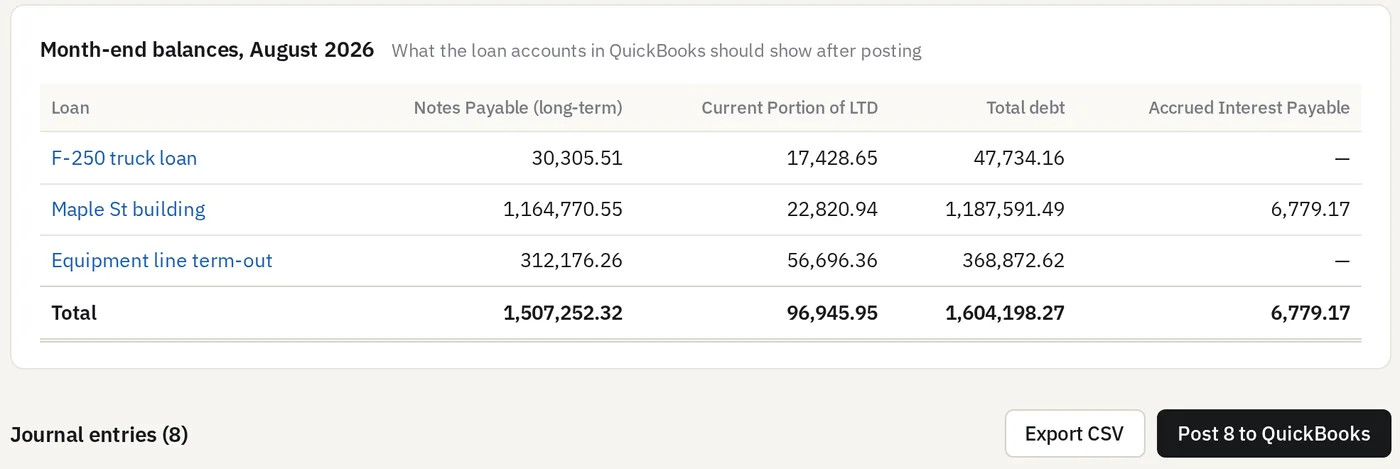
The current portion of long-term debt is trued up every month, so the balance sheet is right whenever you look.
Three steps. Then it's a monthly click.
Connect the client's QuickBooks
Sign in to QuickBooks Online from Amorta and pick the company. Amorta reads the chart of accounts, so you choose the loan, interest and bank accounts from a list, or create a missing account in QuickBooks without leaving Amorta.
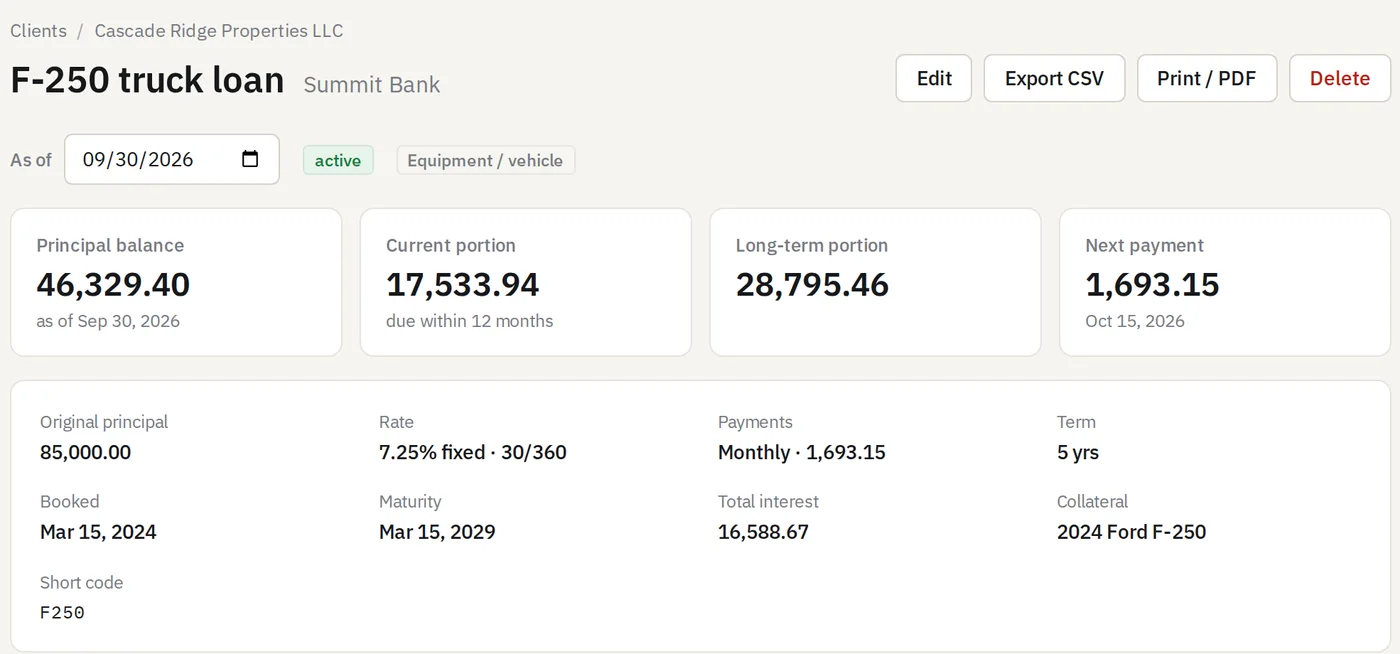
Add the loan from the note
Amount, rate, dates and term. Amorta builds the full schedule and shows the balance, the current portion and the next payment as of any date.
- Monthly, quarterly, semi-annual or annual payments
- 30/360, Actual/360 and Actual/365 interest
- Interest-only periods and balloon payments
- Equipment and property purchases with down payment and trade-in
- Attach the promissory note and loan agreement to the loan
Review the month and post
Each month Amorta lists the entries for every loan of the client, with the balances QuickBooks should show once they're posted. Review them, then post with one click.
- Already-posted entries are never posted twice
- Made a mistake? Undo removes the entry from QuickBooks
- Close a month to lock it, with an optional password
The entries you'd make yourself, already calculated.
Every entry is balanced to the cent and numbered so you can find and sort it in QuickBooks.
Loan payment
ExpenseOn each payment date, paid from the bank with the lender as payee.
| Notes Payable | 1,396.32 | |
| Interest Expense | 296.83 | |
| Checking | 1,693.15 |
Current portion
Journal entryAt month-end, moves the principal due within 12 months to current liabilities.
| Notes Payable | 104.67 | |
| Current Portion of LTD | 104.67 |
Accrued interest
Journal entryOptional per loan: interest earned since the last payment, reversed on the 1st.
| Interest Expense | 6,779.17 | |
| Accrued Interest Payable | 6,779.17 |
Plus the entry that books a new loan, into the bank or straight to the asset purchased. Prefer journal entries for payments too? It's one setting per client.
Built for firms that close books for clients.
Year-end reports
Debt roll-forward, future principal maturities, five-year summary and cash-flow items for the statements and footnotes. Export any of them to CSV.
Close the books
Lock entries through a month-end date, like the QuickBooks closing date, with an optional closing password.
Your whole team
Invite staff by email. Admins manage the team and billing; staff do the work but can't delete clients or loans.
All clients in one place
Every client's debt and upcoming payments on one page, and what still needs posting on each client's overview.
Documents with the loan
Keep the note, agreement and statements attached to the loan they belong to.
Secure by default
Two-step sign-in for every user. QuickBooks access is encrypted and never reaches the browser.
Pay for the loans you track. Nothing else.
One simple plan
$20 minimum per month, which covers your first 5 loans.
- 30-day free trial, no card needed
- Paid-off and archived loans are free
- Unlimited clients and team members
- Every feature included
- Cancel anytime from the app
12 × $4. Billed monthly in US dollars through Stripe.
Questions
Which QuickBooks does Amorta work with?
QuickBooks Online. QuickBooks Desktop isn't supported.
What kinds of loans can I track?
Fixed-rate term loans: equipment and vehicle loans, mortgages, SBA and bank term loans, notes to related parties. Interest-only periods and balloon payments are supported. Variable-rate loans and lines of credit aren't supported yet.
What counts as an active loan?
Any loan with a balance, including one booked for a future date. Loans that are paid off, archived, or belong to an archived client are free. Amorta counts them every night, and each monthly invoice uses the latest count.
Does Amorta post anything without me?
No. Nothing reaches QuickBooks until someone in your firm reviews the entries and clicks Post. You can undo a posted entry from Amorta, and closed months can't be changed.
What if the client's loan is already on the books?
Enter it with its original terms. Amorta shows every month's entries, but you only post the months you need. Close the books through your last reconciled month and everything before it stays locked and out of the way.
What happens when the trial ends?
Add a card any time during the 30 days; you're first charged when the trial ends. If you don't, your account becomes read-only: you can still view, edit and export everything, but can't add loans or post to QuickBooks.
Is our clients' data safe?
Every user signs in with a password and an authenticator code. Each firm's data is walled off from every other firm in the database itself, QuickBooks access tokens are encrypted, and documents are kept in private storage. We don't sell data or use it to train AI. See the privacy policy.
Can I see a demo first?
Yes. Email agarcia@amorta.io and we'll walk you through it with your own loan. Or start the free trial and add one loan; it takes about two minutes.
Try it on one client's loans this month.
30 days free. No card. Built by a CPA for accounting firms.
Start your free trial